Top-down Renderer

2D Top-down renderer is widely used in this documentation for rendering the results, as it is lightweight and can run on any platforms without GPU requirement. And the simulation results are exactly the same using either 3D renderer or top-down renderer.
Lifetime
You are free to launch this renderer at any timestep by calling env.render(mode="topdown"). The renderer will be created and work until the env.reset() is called. It will shutdown the top_down_renderer and destroy it. Thus the lifetime of a renderer is the period between calling env.render for the first time and executing next env.reset.
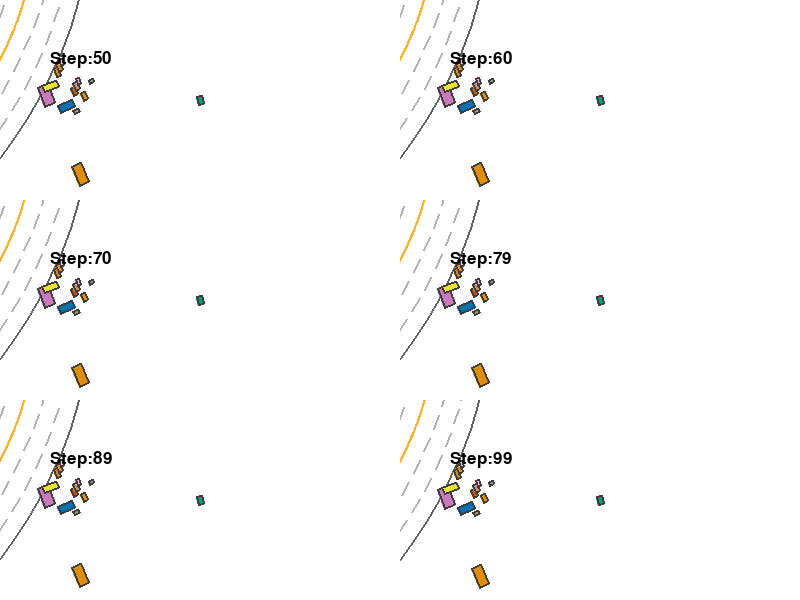
The following example running an environment for 100 steps. It launches the renderer when episode_step=50, and thus the generated gif only records the last 50 frames. Also, it demonstrate how to record screen and generate gif.
from metaurban.envs import SidewalkStaticMetaUrbanEnv
from IPython.display import Image
from metaurban.utils import print_source, get_source
import cv2
env = SidewalkStaticMetaUrbanEnv(dict(object_density=0.1, log_level=50))
env.reset()
for i in range(100):
    env.step([0,0])
    if i>=50:
        env.render(mode="topdown",
                   window=False,
                   screen_size=(400, 200),
                   screen_record=True,
                   text={"Step": i})
env.top_down_renderer.generate_gif()
print("Before reset the renderer is", env.top_down_renderer)
env.reset()
print("After reset the renderer is", env.top_down_renderer)

env.close()

Image(open("demo.gif", 'rb').read())
Before reset the renderer is <metaurban.engine.top_down_renderer.TopDownRenderer object at 0x7efb75b70f10>
After reset the renderer is None
Configs
The env.render() accepts parameters like screen_size, window and so on as input which defines the behavior of the top-down renderer. Note that these parameters only take effect when you call env.render for the first time in one episode.
All accepted arguments for creating the top-down renderer are as follows.
from metaurban.engine.top_down_renderer import TopDownRenderer
from metaurban.utils import CONFIG, FUNC_2
print_source(TopDownRenderer.__init__, ["def", "# doc-end"], colorscheme=FUNC_2)
def __init__(
        self,
        film_size=(2000, 2000),  # draw map in size = film_size/scaling. By default, it is set to 400m
        scaling=5,  # None for auto-scale
        screen_size=(800, 800),
        num_stack=15,
        history_smooth=0,
        show_agent_name=False,
        camera_position=None,
        target_agent_heading_up=False,
        target_vehicle_heading_up=None,
        draw_target_vehicle_trajectory=False,
        semantic_map=False,
        semantic_broken_line=True,
        draw_contour=True,
        window=True,
        screen_record=False,
    ):
        """
        Launch a top-down renderer for current episode. Usually, it is launched by env.render(mode="topdown") and will
        be closed when next env.reset() is called or next episode starts.
        Args:
            film_size: The size of the film used to draw the map. The unit is pixel. It should cover the whole map to
            ensure it is complete in the rendered result. It works with the argument scaling to select the region
            to draw. For example, (2000, 2000) film size with scaling=5 can draw any maps whose width and height
            less than 2000/5 = 400 meters.

            scaling: The scaling determines how many pixels are used to draw one meter.

            screen_size: The size of the window popped up. It shows a region with width and length = screen_size/scaling

            num_stack: How many history steps to keep. History trajectory will show in faded color. It should be > 1

            history_smooth: Smoothing the trajectory by drawing less history positions. This value determines the sample
            rate. By default, this value is 0, meaning positions in previous num_stack steps will be shown.

            show_agent_name: Draw the name of the agent.

            camera_position: Set the (x,y) position of the top_down camera. If it is not specified, the camera will move
            with the ego car.

            target_agent_heading_up: Whether to rotate the camera according to the ego agent's heading. When enabled,
            The ego car always faces upwards.

            target_vehicle_heading_up: Deprecated, use target_agent_heading_up instead!

            draw_target_vehicle_trajectory: Whether to draw the ego car's whole trajectory without faded color

            semantic_map: Whether to draw semantic color for each object. The color scheme is in TopDownSemanticColor.

            semantic_broken_line: Whether to draw broken line for semantic map

            draw_contour: Whether to draw a counter for objects

            window: Whether to pop up the window. Setting it to 'False' enables off-screen rendering

            screen_record: Whether to record the episode. The recorded result can be accessed by
            env.top_down_renderer.screen_frames or env.top_down_renderer.generate_gif(file_name, fps)
        """
        #
Semantic Top-down View
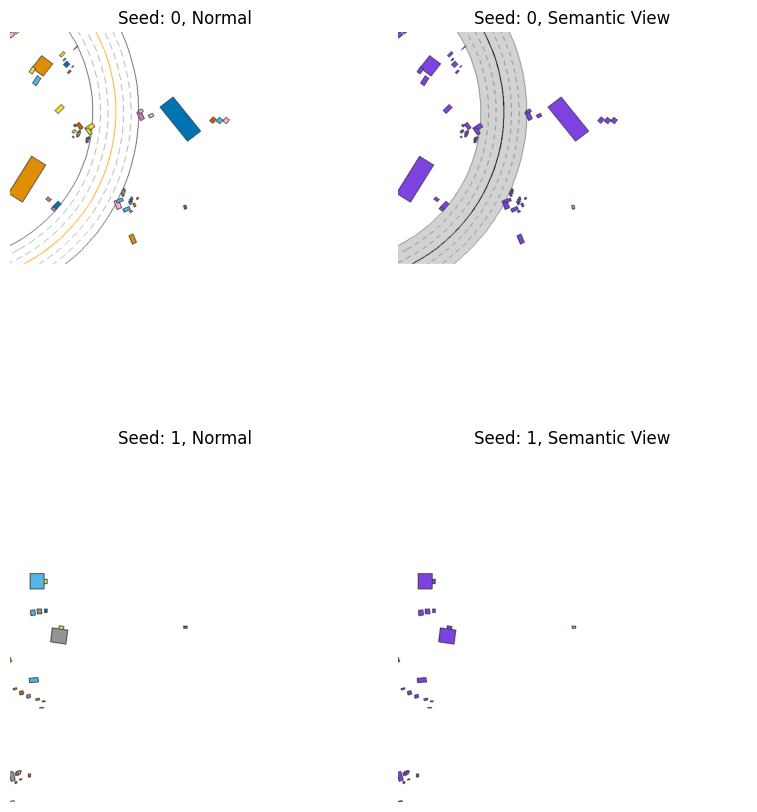
The top-down view can be changed to semantic view by adding semantic_map=True when creating the renderer.
from metaurban.envs import SidewalkStaticMetaUrbanEnv

env = SidewalkStaticMetaUrbanEnv(dict(object_density=0.1,
                        log_level=50,
                        num_scenarios=2))

env.reset(seed=0)
frame_1 = env.render(mode="topdown", window=False,
                     screen_size=(800, 800), scaling=5)

env.reset(seed=0)
frame_2 = env.render(mode="topdown", window=False,
                     screen_size=(800, 800), scaling=5, semantic_map=True)

env.reset(seed=1)
frame_3 = env.render(mode="topdown", window=False,
                     screen_size=(800, 800), scaling=5)

env.reset(seed=1)
frame_4 = env.render(mode="topdown", window=False,
                     screen_size=(800, 800), scaling=5, semantic_map=True)

env.close()

import matplotlib.pyplot as plt
fig, axes = plt.subplots(2, 2, figsize=(10, 10)) # You can adjust the figsize as needed
axes[0][0].imshow(frame_1)
axes[0][0].axis('off')  # Turn off axis
axes[0][0].set_title("Seed: 0, Normal")
axes[0][1].imshow(frame_2)
axes[0][1].axis('off')  # Turn off axis
axes[0][1].set_title("Seed: 0, Semantic View")
axes[1][0].imshow(frame_3)
axes[1][0].axis('off')  # Turn off axis
axes[1][0].set_title("Seed: 1, Normal")
axes[1][1].imshow(frame_4)
axes[1][1].axis('off')  # Turn off axis
axes[1][1].set_title("Seed: 1, Semantic View")
plt.subplots_adjust(wspace=0.)
plt.show()